- A/B testing can increase your YouTube CTR by 30-200% through data-driven optimization
- Test only one element at a time (thumbnail OR title, not both) for clear insights
- Run tests for 7-14 days with at least 1,000-2,000 impressions for statistical significance
- Thumbnails have 3x more impact on CTR than titles - prioritize thumbnail testing first
- Use InstantViews Video Analyzer to generate high-performing test variants based on your content
YouTube A/B testing is the difference between guessing what works and knowing what drives clicks. Top creators don't rely on gut feelings - they test everything, measure results, and optimize based on data.
Here's the problem: most creators upload a video, pick a thumbnail they like, write a title that sounds good, and hope for the best. Then they wonder why their CTR is stuck at 2-3% while competitors get 10%+.
This complete guide shows you exactly how to A/B test your YouTube thumbnails and titles like a pro, using proven strategies that actually move the needle on your channel's performance.
What is A/B Testing for YouTube?
A/B testing (also called split testing) is the process of comparing two or more versions of an element to determine which performs better. On YouTube, this typically means testing:
- Thumbnails - Different images, text overlays, colors, or compositions
- Titles - Different phrasings, keywords, or emotional triggers
- Descriptions - Different opening hooks or keyword placements
- Tags - Different keyword strategies and combinations
The goal is simple: find what resonates with your audience and drives more clicks, views, and engagement.
Why A/B Testing Matters
YouTube's algorithm prioritizes videos that get high CTR in the first 24-48 hours after upload. Here's why testing is critical:
CTR Directly Affects Algorithm Performance
A video with 10% CTR will get 3-5x more impressions than a video with 3% CTR. The algorithm amplifies high-performing content and suppresses low-performing content.
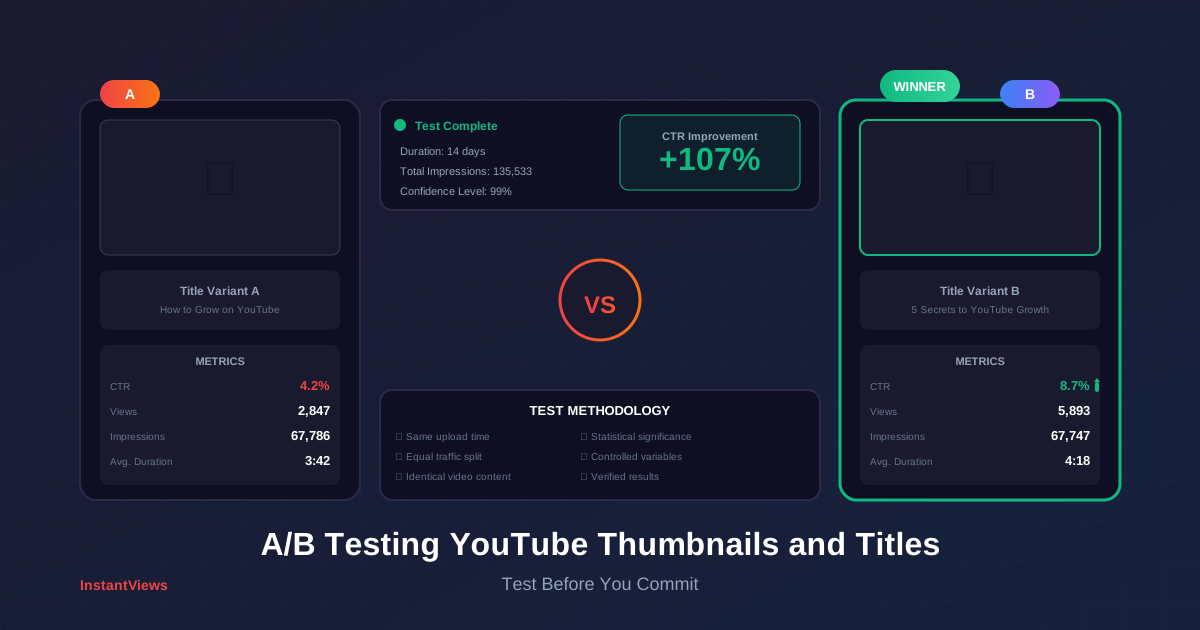
One creator increased CTR from 4.2% to 8.7% through thumbnail testing, resulting in 280% more views over 30 days with zero change to content quality.
Small Improvements = Massive Growth
Improving CTR by just 1-2% can double your channel's growth rate. A/B testing helps you make these incremental improvements consistently.
Audience Preferences Change Over Time
What worked 6 months ago might not work today. Continuous testing keeps you aligned with current audience preferences and platform trends.
The data is clear: channels that systematically A/B test grow 2-3x faster than channels that don't.
Testing Thumbnails Effectively
Thumbnails account for 60-80% of click decisions. Here's how to test them properly:
1. Create Distinct Test Variants
Don't test minor variations like slightly different colors. Test fundamentally different approaches:
- Face vs. No Face - Human faces vs. text/graphics only
- Close-up vs. Wide Shot - Different composition styles
- Text-Heavy vs. Minimal Text - Amount of overlay text
- Bright vs. Dark - Color scheme and mood
- Emotional Expression - Different facial expressions (surprised, excited, serious)
| Thumbnail Element | What to Test | Expected Impact |
|---|---|---|
| Background Color | Bright vs. dark, warm vs. cool tones | 10-25% CTR change |
| Text Size | Large bold vs. small subtle | 15-35% CTR change |
| Facial Expression | Surprised vs. happy vs. serious | 20-40% CTR change |
| Composition | Rule of thirds vs. centered | 5-15% CTR change |
| Arrows/Graphics | With vs. without visual cues | 10-30% CTR change |
| Contrast Level | High contrast vs. subtle blending | 15-25% CTR change |
2. Test Thumbnail Readability
Your thumbnail must be readable at small sizes. Test this by:
- Viewing thumbnails at 320x180px (mobile size)
- Checking readability in bright and dark environments
- Ensuring text is legible in 3 seconds or less
- Testing on different devices (phone, tablet, desktop)
Don't create thumbnails that only look good at large sizes. Over 70% of YouTube views happen on mobile devices where thumbnails are tiny. If viewers can't read your text on mobile, your CTR will suffer.
3. Psychological Triggers to Test
These thumbnail elements trigger emotional responses that drive clicks:
Curiosity Gap
Show a result or transformation without revealing how it happened. Makes viewers click to satisfy their curiosity.
Before/after image with the "how" obscured or highlighted with question marks. "I tried this for 30 days" with surprising visible result.
Emotion Amplification
Exaggerated facial expressions (shock, excitement, disgust) capture attention in crowded feeds.
Wide-eyed surprise face, pointing at text, open-mouth reaction. Test different emotion intensities to find your audience's preference.
Pattern Interruption
Use unexpected colors, angles, or compositions that break the viewer's scroll pattern.
If your niche uses blue backgrounds, test bright yellow. If everyone uses face thumbnails, test text-only. Contrast = attention.
Get AI-Powered Thumbnail Ideas
Our Video Analyzer generates thumbnail suggestions based on your content and competitor analysis. Stop guessing, start testing with data.
Analyze Your Video →Testing Titles for Maximum CTR
While thumbnails get more attention, titles are critical for search rankings and setting viewer expectations. Here's how to test them:
1. Title Formulas to Test
Different title structures appeal to different psychological triggers:
How-To Formula:
"How to [Desired Result] in [Time Frame] (Even if [Common Obstacle])"
Example: "How to Get 1000 Subscribers in 30 Days (Even with 0 Views)"

Number Formula:
"[Number] [Adjective] Ways to [Desired Result] [Time/Context]"
Example: "7 Proven Ways to Double Your YouTube Views in 2025"

Mistake Formula:
"[Number] [Topic] Mistakes Killing Your [Desired Result]"
Example: "5 Thumbnail Mistakes Killing Your CTR (And How to Fix Them)"

Secret/Hack Formula:
"[Authority Figure]'s Secret to [Desired Result] [Qualifier]"
Example: "MrBeast's Secret to Viral Thumbnails (Revealed)"

Urgency Formula:
"Do This Before [Time/Event] or [Negative Consequence]"
Example: "Fix Your Titles Before 2025 or Watch Your Channel Die"

Curiosity Formula:
"Why [Common Thing] is Actually [Unexpected Truth]"
Example: "Why 'Good' Thumbnails Actually Hurt Your Channel"
2. Title Length Testing
YouTube displays approximately:
- Desktop: 60-70 characters before truncation
- Mobile: 40-50 characters before truncation
- Search Results: 50-60 characters visible
Test both short punchy titles (30-40 chars) and longer descriptive titles (60-70 chars) to see what your audience prefers.
3. Keyword Placement Testing
Test these keyword position strategies:
| Strategy | Example | Best For |
|---|---|---|
| Front-Loaded | "YouTube SEO: Complete 2025 Guide" | Search-focused content |
| End-Loaded | "Complete 2025 Guide (YouTube SEO)" | Browse features, curiosity-driven |
| Natural Integration | "Master YouTube SEO in 2025" | Balance of search + browse |
| Parenthetical | "Grow Your Channel Fast (YouTube SEO)" | Adding context without keyword stuffing |
4. Emotional Words That Increase CTR
Test titles with these high-impact words:
- Power Words: Proven, Secret, Ultimate, Instant, Guaranteed, Effortless
- Numbers: Specific numbers (7, 37, 101) outperform vague quantities
- Time Frames: Today, Now, 2025, This Week, 24 Hours
- Negatives: Stop, Avoid, Never, Don't, Mistake, Killing
- Question Words: Why, How, What, When, Which
How to Measure Test Results
Measuring A/B tests correctly is crucial. Here's your step-by-step measurement process:
1. Primary Metrics to Track
Click-Through Rate (CTR)
The percentage of people who see your thumbnail and click. This is your primary thumbnail/title success metric.
How to find it: YouTube Analytics > Reach > Impressions click-through rate
Good performance: 4-6% average, 6-10% good, 10%+ excellent
Average View Duration (AVD)
How long viewers watch after clicking. A high CTR with low AVD means your thumbnail/title are misleading.
How to find it: YouTube Analytics > Engagement > Average view duration
Good performance: 40-50% retention for long videos, 50-70% for short videos
Impressions
How many times your thumbnail was shown. A good CTR with low impressions means YouTube isn't promoting your video.
How to find it: YouTube Analytics > Reach > Impressions
Good performance: Varies by channel size; look for growth week-over-week
2. Statistical Significance
Don't declare a winner too early. You need sufficient data:
- Minimum impressions: 1,000-2,000 per variant
- Minimum test duration: 7-14 days
- Confidence level: Look for 20%+ difference in CTR
- Sample diversity: Test across different days of week
A thumbnail that gets 8% CTR in the first 24 hours might drop to 4% over a week as the algorithm shows it to broader audiences. Always wait for stabilization before declaring a winner.
3. YouTube Analytics Dashboard Setup
Create a custom report to track A/B tests:
- Go to YouTube Studio > Analytics > Advanced Mode
- Add these metrics to your dashboard:
- Impressions click-through rate
- Average view duration
- Impressions
- Views
- Likes/dislikes ratio
- Comments
- Compare date ranges: Test period vs. baseline period
- Export data to spreadsheet for deeper analysis
Tools for A/B Testing
While YouTube doesn't offer native A/B testing, these tools and methods help you test effectively:
1. Manual Testing Methods
Upload Time Testing
Upload two similar videos with different thumbnails/titles at different times. Compare performance after 7-14 days.
Pros: Simple, free, controlled testing
Cons: Requires creating similar content, slower results
Thumbnail Swap Testing
Upload with Thumbnail A, track performance for 7 days, swap to Thumbnail B, track for another 7 days.
Pros: Works on existing videos, easy to implement
Cons: Algorithm momentum affects results, confuses some viewers
2. Third-Party A/B Testing Tools
| Tool | Features | Best For | Pricing |
|---|---|---|---|
| TubeBuddy | Thumbnail testing, title optimization, bulk processing | Established channels with regular uploads | $9-$49/month |
| VidIQ | Competitor analysis, trend alerts, keyword research | Data-driven creators, SEO focus | $7.50-$39/month |
| Thumbnail Test | Automated thumbnail rotation, analytics integration | High-volume channels testing multiple variants | $29-$99/month |
| Google Optimize | Web-based A/B testing for embedded videos | Creators with their own websites | Free (discontinued 2023, use GA4) |
3. Analytics Tools for Measurement
- YouTube Studio: Native analytics platform (free, essential)
- Google Analytics: Track embedded video performance on your site
- Social Blade: Historical data and growth tracking (free + paid)
- Spreadsheets: Manual tracking for precise control and custom metrics
How InstantViews Video Analyzer Provides A/B Test Ideas
The InstantViews Video Analyzer takes the guesswork out of A/B testing by providing data-driven suggestions:
Content-Based Thumbnail Suggestions
The analyzer scans your video content and suggests thumbnail concepts that align with your most engaging moments. It identifies high-impact scenes, emotional peaks, and visual patterns that drive clicks.
Upload your video > Analyzer identifies 3-5 thumbnail-worthy moments > Generates multiple design variations > You test the variants with highest predicted performance first.
Title Optimization Recommendations
Based on your video's transcript and topic, the Video Analyzer suggests multiple title variations optimized for different goals: search ranking, browse features, or viral potential.
For a video about "growing a YouTube channel," it might suggest:
Search-optimized: "YouTube Growth Strategy 2025 - Proven Methods"
Browse-optimized: "I Grew from 0 to 100K Subs in 6 Months (Here's How)"
Viral-optimized: "The YouTube Algorithm Secret No One Talks About"
Competitor Pattern Analysis
The analyzer examines successful videos in your niche and identifies thumbnail/title patterns that consistently perform well, giving you proven templates to test.
Hook and Pacing Insights
Beyond thumbnails and titles, the analyzer provides insights on your video hooks and pacing to ensure your content delivers on the promise made by your thumbnail/title combination.
"The Video Analyzer doesn't just suggest random variations - it analyzes what's already working in your niche and customizes recommendations based on your specific content. It's like having a YouTube expert review every video before you publish."
Best Practices and Common Mistakes
A/B Testing Best Practices
- Test one variable at a time: Thumbnail OR title, not both simultaneously
- Document everything: Keep a spreadsheet of all tests, variants, and results
- Test consistently: Make A/B testing part of your upload workflow, not a one-time thing
- Learn from losses: Failed tests teach you what NOT to do - equally valuable
- Respect your audience: Don't use clickbait that misleads viewers
- Consider video performance holistically: High CTR means nothing if watch time is terrible
- Test across video types: What works for tutorials might not work for vlogs
- Use control groups: Keep some videos unchanged to establish baseline performance
Common A/B Testing Mistakes
Changing thumbnail, title, description, and tags simultaneously makes it impossible to know what caused performance changes. Test one thing at a time.
Declaring a winner after 24 hours or 100 views leads to false conclusions. Wait for statistical significance (7-14 days, 1,000+ impressions).
A thumbnail that gets 15% CTR but 20% AVD is worse than one with 8% CTR and 60% AVD. Optimize for quality engagement, not just clicks.
Over 70% of YouTube views happen on mobile devices. If your thumbnail isn't readable on a phone, you're losing the majority of potential clicks.
Testing similar styles to successful competitors is smart. Copying their exact thumbnails/titles makes you forgettable. Test their patterns, not their specific executions.
Advanced Testing Strategies
Once you've mastered basic A/B testing, try these advanced techniques:
- Sequential testing: Test multiple variants one after another to progressively optimize
- Audience segmentation: Test different thumbnails for different traffic sources (search vs. browse)
- Time-based testing: Test performance differences by upload day/time
- Seasonal optimization: Test holiday-themed variants during peak seasons
- Multivariate testing: For high-traffic channels, test multiple elements with statistical tools
Start Testing With Data-Driven Insights
Stop guessing what will work. Get AI-powered thumbnail and title suggestions based on your content analysis and competitor patterns. Start your first test today.
Try Video Analyzer Free →Frequently Asked Questions
A/B testing on YouTube is the process of comparing two or more versions of video elements (thumbnails, titles, descriptions) to determine which performs better. You test one variable at a time and measure results using metrics like CTR, watch time, and engagement to make data-driven optimization decisions.
Run tests for at least 7-14 days to collect sufficient data across different days of the week and audience behaviors. You need at least 1,000-2,000 impressions per variant for statistically significant results. High-traffic channels can run shorter tests, while smaller channels may need 2-4 weeks.
Yes, you can change thumbnails on existing videos to test performance. However, YouTube doesn't offer built-in A/B testing, so you'll need to manually change thumbnails and track results over time, or use third-party tools. Be careful not to confuse your audience with frequent changes on high-performing videos.
A good CTR varies by niche and video type. Generally, 4-6% is average, 6-10% is good, and above 10% is excellent. New channels often see 2-4% CTR. Focus on improving your baseline rather than comparing to others, as factors like niche, audience size, and video type significantly impact CTR.
Start with thumbnails, as they have the biggest impact on CTR (60-80% of click decisions are based on thumbnails). Once you've optimized your thumbnail, test titles. Never test both simultaneously, as you won't know which element caused the performance change. Test one variable at a time for clear insights.
The InstantViews Video Analyzer provides data-driven suggestions for thumbnail and title variations based on your content analysis. It identifies which elements resonate with your audience, suggests high-performing patterns, and helps you create test variants that are more likely to succeed, reducing trial and error in your testing process.