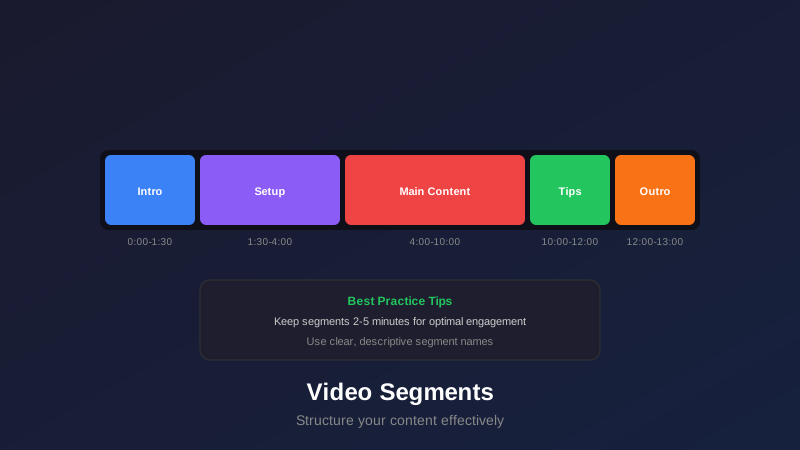
- Video segments are content divisions created by chapters that improve navigation and engagement
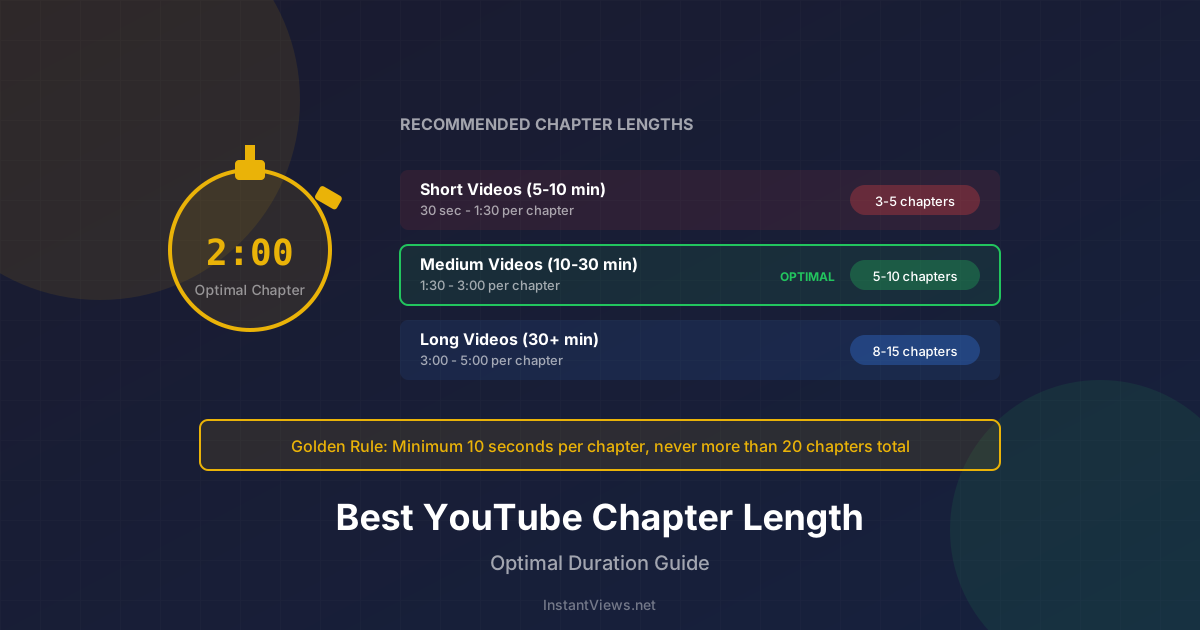
- Optimal segment length varies by content type: tutorials 3-7 min, vlogs 1-3 min, podcasts 5-10 min
- Natural topic breaks create better segments than arbitrary time divisions
- Descriptive segment names with keywords improve SEO and viewer experience
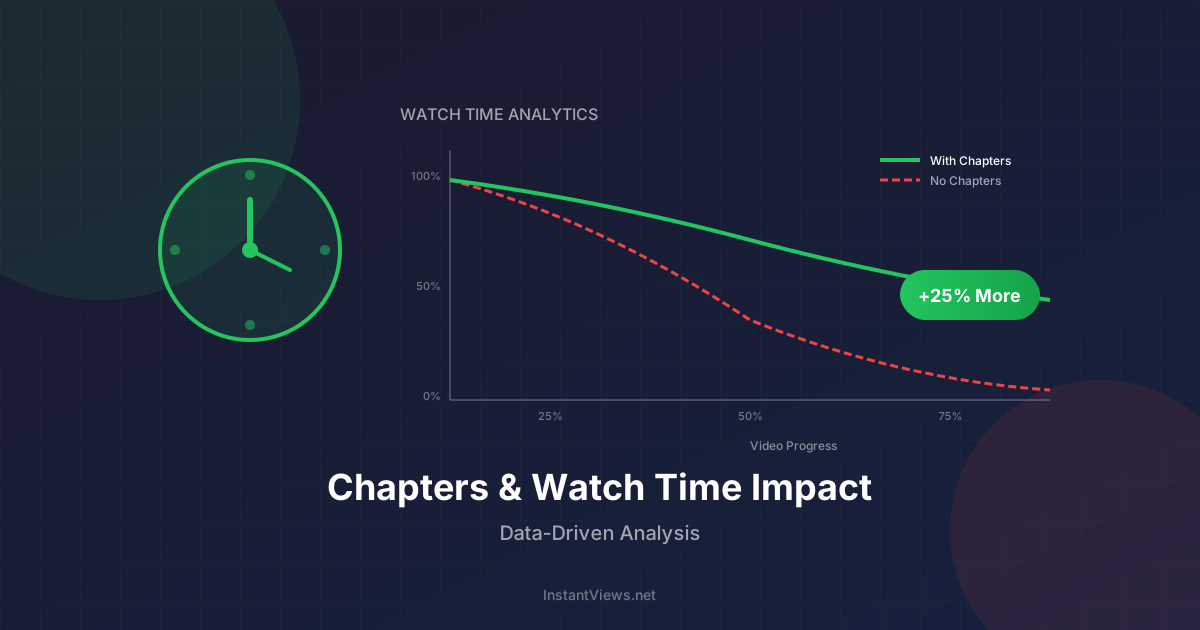
- Well-structured segments can increase watch time by 15-30%
- Plan segments before filming for more cohesive content structure
Video segmentation is one of the most underutilized strategies in YouTube content creation. While many creators add chapters as an afterthought, strategic segmentation can transform viewer engagement, boost watch time, and dramatically improve your video's performance in search and recommendations.
The difference between basic chapters and strategic segments is execution. Anyone can divide a video into arbitrary sections. But creating segments that enhance viewer experience, maximize retention, and improve discoverability requires understanding your content, your audience, and how YouTube's algorithm interprets video structure.
This guide covers everything you need to know about video segmentation: from identifying natural breaks to optimizing segment length for different content types, and using data to refine your strategy.
What Are Video Segments and Why They Matter
Video segments are the individual content sections created when you add YouTube chapters to your video. While chapters are the technical feature you implement, segments are the actual viewer experience those chapters create.
The Difference Between Chapters and Segments
- Chapters: The timestamps and titles you add to your description (technical implementation)
- Segments: The content divisions viewers experience when navigating your video (user experience)
Think of chapters as the tool and segments as the strategy. Your chapter placement creates segments, but strategic segmentation means those divisions enhance rather than interrupt the viewing experience.
Why Segmentation Matters
Well-structured segments provide multiple benefits:
- Improved navigation: Viewers find specific information faster, reducing frustration and abandonment
- Increased watch time: Clear structure encourages viewers to watch more segments
- Better SEO: Each segment title is indexed and can rank for different keywords
- Enhanced mobile experience: Mobile viewers especially benefit from quick navigation
- Higher engagement: Viewers interact more with well-organized content
- Algorithmic signals: YouTube interprets segment retention as quality indicators
Videos with strategic segmentation see 15-30% higher average view duration compared to similar videos without chapters.
Optimal Segment Length by Content Type
There's no universal segment length. The optimal duration depends entirely on your content type, audience expectations, and video purpose. Here's a comprehensive breakdown:
Tutorial and Educational Content
Recommended segment length: 3-7 minutes
Educational content requires longer segments because each section needs to thoroughly explain a concept or demonstrate a complete step.
- Software tutorials: 4-6 minutes per feature or tool
- Cooking recipes: 2-4 minutes per major step (prep, cook, assemble)
- DIY projects: 5-8 minutes per construction phase
- Academic lessons: 6-10 minutes per concept or theorem
Each segment should deliver complete, actionable information. Don't split a step across multiple segments just to hit a target length.
Vlogs and Entertainment
Recommended segment length: 1-3 minutes
Entertainment content moves faster and benefits from shorter, punchier segments that match the dynamic nature of the content.
- Daily vlogs: 1-2 minutes per location or activity
- Challenge videos: 2-3 minutes per attempt or round
- Reaction content: 1-2 minutes per clip reaction
- Comedy sketches: 30-90 seconds per scene or bit
Shorter segments match viewer attention patterns for entertainment content and allow quick navigation to highlights.
Podcasts and Interviews
Recommended segment length: 5-10 minutes
Long-form conversational content needs longer segments to allow complete discussion of topics without constant interruption.
- Interview podcasts: 6-10 minutes per major topic or question cluster
- News/analysis: 5-8 minutes per story or theme
- Panel discussions: 7-12 minutes per discussion topic
- Storytelling: 8-15 minutes per story arc or chapter
These segments should align with natural conversation flow and topic transitions.
Product Reviews and Comparisons
Recommended segment length: 2-4 minutes
Review content works best with medium-length segments that thoroughly cover individual features or comparison points.
- Tech reviews: 2-3 minutes per feature category (design, performance, battery)
- Product unboxing: 1-2 minutes per section (package, contents, first impressions)
- Comparison videos: 3-5 minutes per comparison criteria
- Long-term reviews: 4-6 minutes per usage scenario
Viewers often jump to specific features they care about, so clear segment divisions are critical.
Gaming Content
Recommended segment length: 3-6 minutes
Gaming videos vary widely, but segments should align with in-game milestones or content shifts.
- Walkthroughs: 4-7 minutes per level or mission
- Let's Plays: 3-5 minutes per significant event or progression point
- Tips/guides: 2-4 minutes per tip or strategy
- Highlights/montages: 1-2 minutes per match or moment
Match segments to game structure when possible (levels, rounds, matches).
Automatically Generate Optimized Segments
Our AI analyzes your video content and creates perfectly-timed segments optimized for your content type. No manual planning needed.
Try Free Segment Generator →How to Identify Natural Segment Breaks
The most effective segments align with natural content transitions. Forcing arbitrary breaks disrupts viewer experience and can actually decrease engagement.
Types of Natural Breaks
Topic Transitions
Location or Scene Changes
Before/After Demonstrations
Question Shifts in Interviews
Conceptual Milestones
How to Plan Segments Before Filming
Pre-planning segments creates more cohesive content than adding them in post-production:
- Outline your script by topics: Break down what you'll cover and in what order
- Identify major transitions: Mark where one topic ends and another begins
- Estimate timing: Roughly how long will each section take to explain?
- Plan visual cues: Can you signal transitions with graphics, location changes, or b-roll?
- Script smooth transitions: Plan how you'll verbally bridge from one segment to the next
Don't break mid-explanation just to create more segments. A segment that ends with "...and we'll cover that in the next section" creates a poor viewer experience. Each segment should feel complete.
Segment Naming Conventions and Best Practices
Your segment names serve dual purposes: helping viewers navigate and improving SEO. Both matter equally.
The Formula for Effective Segment Names
Great segment names follow this structure: [Action/Topic] + [Specific Detail] + [Context if needed]
| Content Type | Bad Name | Good Name |
|---|---|---|
| Tutorial | Part 3 | Install Python Dependencies |
| Review | Performance | Gaming Performance: 4K Benchmarks |
| Vlog | Next Stop | Exploring Central Park |
| Interview | Question 5 | Career Advice for Beginners |
| Cooking | Step 2 | Prepare the Marinade |
Naming Best Practices
- Start with action words: Setup, Configure, Review, Explore, Compare, Create
- Include keywords: What would viewers search for? Include those terms
- Be specific: "Camera Settings" becomes "Camera Settings for Portraits"
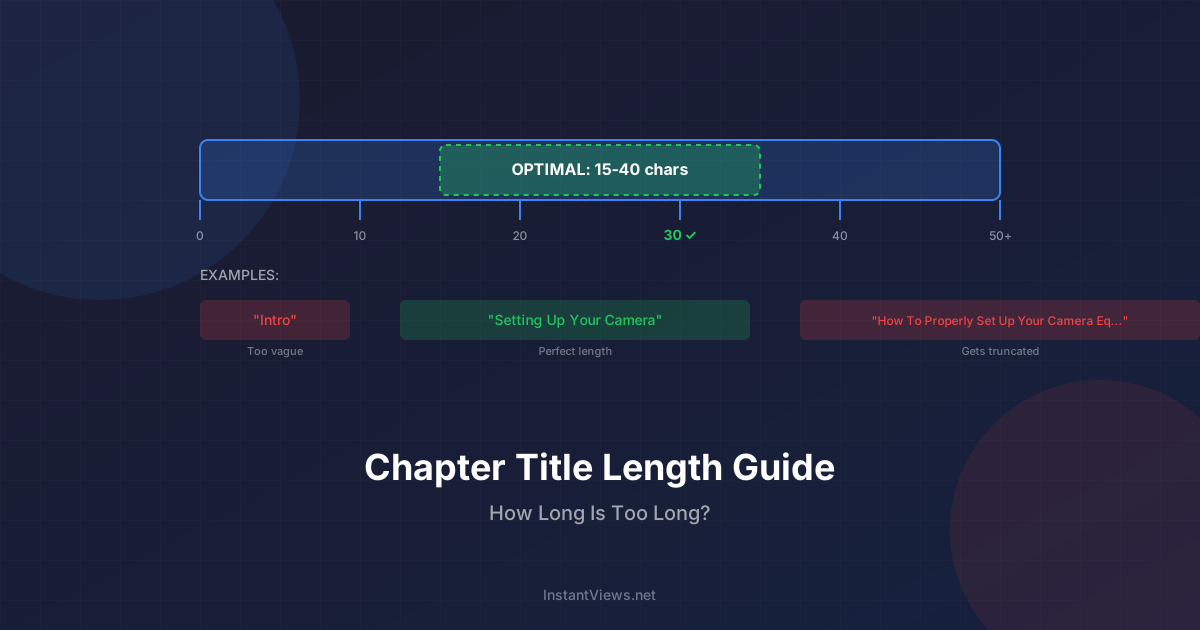
- Keep it under 50 characters: Longer titles get truncated on mobile
- Use consistent formatting: If you capitalize one title, capitalize them all
- Avoid generic terms: Introduction, Part 1, Section A provide no value
- Make them scannable: Viewers should understand content at a glance
Keyword Optimization for Segments
Each segment title is indexed by YouTube and can rank independently. This multiplies your SEO opportunities:
- Target different long-tail keywords in each segment title
- Include your main keyword in the first segment (usually intro)
- Use related keywords in subsequent segments
- Match search intent (how-to, what is, best, vs, etc.)
How Segments Affect Watch Time Metrics
Understanding the relationship between segments and watch time is crucial for optimization. Segments can both help and hurt watch time depending on implementation.
Positive Watch Time Effects
- Reduced early abandonment: Viewers who find their topic quickly stay longer
- Increased exploration: Clear segments encourage viewers to check out additional sections
- Better mobile retention: Mobile viewers with less patience benefit most from navigation
- Completion motivation: Progress bars showing segment completion encourage finishing
Potential Watch Time Risks
- Targeted skipping: Viewers jump to one segment and leave without watching the rest
- Overwhelming choices: Too many segments can lead to decision paralysis and abandonment
- Discovery of exit points: Poor segment quality revealed through easy navigation
The Watch Time Sweet Spot
Research shows optimal segment strategies balance navigation with retention:
Videos with 4-8 segments see the highest watch time improvement. Below 4, navigation benefit is minimal. Above 8, viewers start experiencing decision fatigue.
Analyzing Segment Performance
YouTube Analytics provides segment-level data you should review regularly:
- Most replayed segments: Which segments do viewers watch multiple times?
- Segment retention: What percentage of viewers complete each segment?
- Entry points: Which segments do viewers jump to first?
- Exit points: Where do viewers leave your video?
Track Segment Performance Automatically
Get instant insights into which segments drive engagement and where viewers drop off. Optimize your strategy with data-driven recommendations.
Analyze Your Segments →Segment Strategies for Different Video Types
Let's look at specific segmentation strategies for common video formats:
Tutorial Video Segmentation
Structure tutorials around actionable steps:
0:00 Intro: What You'll Build
0:45 Prerequisites and Setup
3:20 Step 1: Create Project Structure
7:15 Step 2: Configure Dependencies
11:40 Step 3: Build Core Functionality
18:25 Step 4: Add User Interface
24:10 Step 5: Testing and Debugging
28:50 Final Results and Next Steps
Each segment delivers one complete, testable piece of the project.
Review Video Segmentation
Organize reviews around decision criteria:
0:00 Intro and Unboxing
1:30 Design and Build Quality
4:15 Display and Screen Quality
7:45 Performance Benchmarks
12:20 Battery Life Tests
15:10 Camera Quality Samples
18:40 Value and Competitors
21:15 Final Verdict
This structure lets viewers jump to the features they care most about.
Vlog Segmentation
Segment vlogs by location, activity, or time:
0:00 Morning Routine
2:15 Breakfast at Local Cafe
4:30 Exploring the Market
7:10 Unexpected Adventure
10:25 Lunch and Downtown Walk
13:50 Sunset at the Beach
16:20 Dinner Prep and Cook
19:40 Evening Wrap-up
Clear activity divisions help viewers navigate to moments that interest them.
Interview/Podcast Segmentation
Break interviews into topic-based segments:
0:00 Intro: Meet Our Guest
2:30 Early Career and Background
8:45 Breaking Into the Industry
15:20 Overcoming Major Challenges
22:10 Current Projects and Work
29:35 Advice for Beginners
35:50 Rapid Fire Q&A
40:15 Where to Find More
Viewers interested in specific topics can find them immediately.
Comparison Video Segmentation
Structure comparisons with parallel segments:
0:00 Intro: Products Being Compared
1:45 Price and Value Comparison
4:20 Design and Build Quality Face-Off
7:50 Performance: Side-by-Side Tests
12:30 Features: What Each Offers
16:10 Real-World Usage Scenarios
19:40 Pros and Cons Breakdown
22:15 Final Recommendation
This allows direct comparison within each category.
Using Data to Optimize Segment Structure
Data-driven segmentation is more effective than intuition alone. Here's how to use YouTube Analytics to refine your approach:
Key Metrics to Track
| Metric | What It Tells You | Action to Take |
|---|---|---|
| Segment Retention | Percentage who complete each segment | Improve or shorten low-retention segments |
| Most Watched Segments | Which segments get the most views | Create more content around popular topics |
| Skip Patterns | Which segments viewers skip | Consider removing or redesigning skipped segments |
| Rewatch Behavior | Segments viewers replay | Replicate the format/style of rewatched segments |
| Entry Points | Where viewers start watching | Optimize segment titles that attract clicks |
Testing Different Segment Structures
Experiment with segmentation on similar videos to find what works best:
- Baseline video: Create one version with your normal segmentation
- Variation 1: Try longer segments (combine two segments into one)
- Variation 2: Try shorter segments (split one segment into two)
- Compare performance: After 30 days, which approach drove better retention?
Iterating Based on Feedback
Pay attention to viewer comments about navigation:
- "Jumped straight to the [segment name]" - This segment title worked well
- "Where is the [topic]?" - You're missing a segment viewers want
- "Too much [topic]" - A segment may be too long or redundant
- "Perfect breakdown" - Your current structure resonates
Don't over-optimize for targeted viewers at the expense of full watch time. If all your viewers jump to one segment and leave, you're creating a Wikipedia experience rather than engaging content. Balance navigation with retention.
Segment Strategy Checklist
Before publishing, review your segmentation against these criteria:
- Does each segment deliver complete, standalone value?
- Are segment titles descriptive and keyword-optimized?
- Do segments align with natural content breaks?
- Is segment length appropriate for the content type?
- Would you personally use these segments to navigate?
- Do segments encourage exploration of additional content?
Frequently Asked Questions
Video segments are the individual sections created by YouTube chapters. The terms are often used interchangeably - chapters are the technical feature, while segments refer to the content divisions they create. Each segment should represent one complete topic or section of your video.
Tutorial videos perform best with 3-7 minute segments. Each segment should cover one complete step or concept. Complex procedures may need 5-7 minutes, while simple steps can be 2-3 minutes. The key is ensuring each segment delivers complete, actionable information.
Well-structured segments can increase watch time by 15-30% by helping viewers navigate to relevant content, reducing abandonment, and encouraging continued viewing. However, poor segmentation can decrease watch time if viewers jump around or leave after finding specific information.
Plan segments before filming for best results. Pre-planning helps you structure content logically, ensures smooth transitions, and prevents awkward breaks. You can refine segment timing during editing, but the overall structure should guide your filming process.
Use clear, descriptive titles that include relevant keywords. Start with action words for tutorials (Setup, Configure, Test), use descriptive nouns for reviews (Design, Performance, Value), and be specific (avoid generic titles like Part 1 or Section 2). Keep titles under 50 characters for best display.
A 20-minute video typically works best with 5-8 segments, averaging 2.5-4 minutes each. The exact number depends on your content type - educational content may need more segments to break down complex topics, while entertainment content may need fewer longer segments.
Yes, segments significantly improve SEO. Each segment title is indexed by YouTube and can rank in search results. Well-named segments increase your chances of appearing in suggested videos and can trigger featured snippet displays in Google search results.
Natural breaks occur at topic transitions, location changes, before/after demonstrations, question shifts in interviews, or when introducing new concepts. Look for places where you naturally pause or transition in your script. Avoid breaking mid-explanation or during continuous action.
Final Thoughts on Video Segmentation
Strategic video segmentation transforms passive viewing into an interactive, navigable experience. When done well, segments improve every key metric: watch time, retention, click-through rate, and search rankings.
The most important principles to remember:
- Content first, segments second: Let your content's natural structure guide segmentation, not arbitrary time divisions
- Optimize for both navigation and retention: Help viewers find what they need while encouraging continued watching
- Match segment length to content type: Tutorials need different pacing than vlogs or podcasts
- Use descriptive, keyword-rich names: Every segment title is an SEO opportunity
- Analyze and iterate: Let data guide your segmentation strategy over time
Start implementing these segmentation best practices in your next video. Review your analytics after 30 days to see the impact on engagement, and refine your approach based on what the data reveals.
Related guides:
- Best YouTube Chapter Length Guide
- How YouTube Chapters Affect Watch Time
- YouTube Chapters SEO Benefits
- YouTube Chapter Title Length Guide