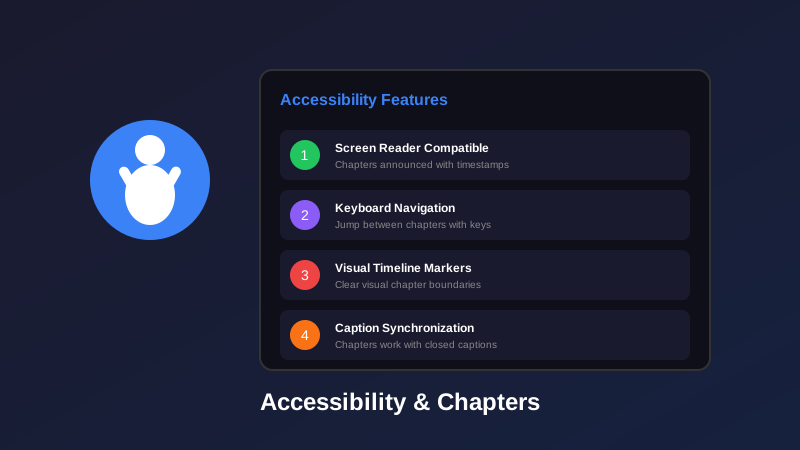
- YouTube chapters make videos accessible to over 1 billion people with disabilities worldwide
- Screen readers can navigate and announce chapter titles, helping blind users understand video structure
- Keyboard-only users can navigate chapters without requiring mouse input
- Chapters combined with captions create a comprehensive accessibility solution for all viewers
- Descriptive chapter titles benefit cognitive accessibility by reducing information overload
Video accessibility isn't optional—it's essential. Over 1 billion people worldwide live with some form of disability, and YouTube chapters play a crucial role in making video content accessible to everyone.
Most creators add chapters for SEO or viewer convenience, but the accessibility benefits are profound. Chapters provide navigation structure for screen reader users, enable keyboard-only navigation, help deaf viewers scan content quickly, and reduce cognitive load for viewers with processing difficulties.
In this comprehensive guide, we'll explore how YouTube chapters improve accessibility across different types of disabilities, best practices for inclusive chapter design, and how to create chapters that work seamlessly with assistive technology.
- Why Video Accessibility Matters
- Screen Reader Compatibility with Chapters
- Keyboard Navigation and Chapters
- Chapters for Deaf and Hard-of-Hearing Viewers
- Cognitive Accessibility Benefits
- Inclusive Chapter Naming Best Practices
- Chapters and Closed Captions Synergy
- Accessibility Guidelines for Timestamps
- Testing Your Chapters for Accessibility
- FAQ
Why Video Accessibility Matters
Accessibility isn't just about compliance—it's about inclusion, reach, and creating content that works for everyone.
Consider these statistics:
- 253 million people live with visual impairments worldwide
- 466 million people have disabling hearing loss
- 15% of the global population experiences some form of disability
- 71% of users with disabilities will leave a website or video that's difficult to use
YouTube chapters provide critical accessibility infrastructure that benefits multiple disability communities simultaneously. When you make your videos accessible, you're not just helping people with disabilities—you're creating better content for everyone.
Accessibility features designed for people with disabilities often benefit the entire user base. Chapters help everyone navigate content more efficiently, but they're essential for users who rely on assistive technology.
Screen Reader Compatibility with Chapters
Screen readers are software tools that convert on-screen content to speech or braille. For YouTube's 253 million blind and low-vision users, chapters provide essential video navigation structure.
How Screen Readers Interact with Chapters
Screen readers like JAWS, NVDA, and VoiceOver announce YouTube chapters as a navigable list:
What happens when a blind user encounters your video:
- Chapter menu discovery: Screen reader announces "Chapters button" or "Show chapters"
- List navigation: User opens chapter list, hears total number of chapters
- Chapter announcement: Each chapter is announced with timestamp and title
- Jump to section: User selects chapter, video jumps to that timestamp
Example screen reader announcement:
"Chapters menu. List with 8 items. Introduction to Screen Readers, 0 minutes 0 seconds. How Screen Readers Work, 2 minutes 30 seconds. Screen Reader Shortcuts, 5 minutes 15 seconds..."
Best Practices for Screen Reader Compatibility
Make Chapter Titles Self-Explanatory
Avoid Emoji-Only Titles
Use Natural Reading Order
Avoid Special Characters
| Not Screen Reader Friendly | Screen Reader Friendly |
|---|---|
| 🚀 | Getting Started |
| Part 1 | Setup | Initial Setup Process |
| >>Advanced Tips<< | Advanced Tips and Tricks |
| @2:30 - Feature Demo | Feature Demonstration |
Keyboard Navigation and Chapters
Millions of people navigate computers exclusively with keyboards due to motor disabilities, visual impairments, or personal preference. YouTube's chapter implementation is fully keyboard accessible.
Keyboard Navigation for Chapters
YouTube supports these keyboard shortcuts for chapter navigation:
| Keyboard Shortcut | Action | Accessibility Benefit |
|---|---|---|
| Shift + N | Next chapter | Jump forward without mouse |
| Shift + P | Previous chapter | Jump backward without mouse |
| Tab | Navigate controls | Move through video controls |
| Enter/Space | Select chapter | Activate focused chapter |
| Arrow Keys | Navigate list | Move through chapter menu |
Why Keyboard Accessibility Matters
- Motor disabilities: Users with limited mobility can't use a mouse precisely
- Efficiency: Power users prefer keyboard shortcuts for speed
- Screen reader users: Primarily use keyboard navigation
- Temporary limitations: Broken mouse, working on laptop trackpad, etc.
Create Accessible Chapters Instantly
Our AI-powered tool generates descriptive, screen-reader-friendly chapter titles. Make your videos accessible to everyone.
Generate Accessible Chapters →Chapters for Deaf and Hard-of-Hearing Viewers
For YouTube's 466 million deaf and hard-of-hearing users, chapters provide essential visual navigation when combined with captions.
How Chapters Help Deaf Viewers
Visual Navigation Benefits
Deaf viewers rely entirely on visual information. Chapters provide:
- Quick content scanning: See video structure at a glance without audio cues
- Topic identification: Understand what's covered without listening
- Efficient navigation: Jump to relevant sections based on visual chapter titles
- Context for captions: Chapter titles provide topic context before reading captions
Example scenario:
A deaf viewer searches for "how to fix iPhone wifi." They find your 20-minute troubleshooting video. Without chapters, they'd need to watch the entire video with captions to find the wifi solution. With chapters titled "WiFi Connection Issues," they jump directly to the relevant section.
Best Practices for Deaf/HOH Accessibility
Be Specific and Visual
Coordinate with Caption Quality
Include Visual Indicators
Don't rely on audio-only transitions between topics. Deaf viewers need visual or textual cues (like chapters and on-screen text) to understand topic changes.
Cognitive Accessibility Benefits
Chapters significantly benefit viewers with cognitive disabilities, learning differences, ADHD, autism, and processing difficulties.
How Chapters Reduce Cognitive Load
Cognitive accessibility is about making information easier to process, understand, and retain:
Chapters help by:
- Chunking information: Breaking long videos into manageable segments
- Providing landmarks: Clear markers help viewers orient themselves
- Reducing overwhelm: Knowing video structure reduces anxiety
- Supporting memory: Easier to remember and return to specific sections
- Enabling breaks: Viewers can pause between chapters without losing context
- Improving focus: Clear sections help maintain attention
Cognitive-Friendly Chapter Design
- Use simple language: Avoid jargon and complex terminology
- Keep titles short: 3-7 words are easiest to process
- Be consistent: Use similar chapter title patterns throughout video
- Number sections: "Step 1," "Step 2" provides clear sequence
- Use familiar patterns: "Introduction," "Main Content," "Conclusion" are universally understood
Inclusive Chapter Naming Best Practices
Writing accessible chapter titles requires thinking about how diverse audiences will interact with your content.
The D.E.S.C. Framework for Accessible Chapters
Use this framework to write inclusive chapter titles:
D - Descriptive
Clearly describe what happens in the section. "Product demo" is vague; "Installing the WordPress Plugin" is descriptive.
E - Explicit
Don't assume context. Titles should make sense without watching previous sections. Screen reader users often jump around.
S - Simple
Use plain language at an 8th-grade reading level. Avoid technical jargon unless your audience specifically needs it.
C - Concise
Keep titles short (30-50 characters). Long titles get truncated and overwhelm viewers.
Before and After Examples
| Non-Inclusive Title | Inclusive Title | Why It's Better |
|---|---|---|
| Intro | Course Overview | Descriptive and clear |
| Stuff you need to know | Prerequisites and Requirements | Professional and specific |
| 🔥🔥🔥 | Advanced Techniques | Text-based, screen reader friendly |
| The thing I mentioned earlier | Database Configuration Steps | Self-contained, no assumptions |
| This is where it gets complicated... | Complex Setup Process | Concise, honest about difficulty |
Chapters and Closed Captions Synergy
Chapters and captions work together to create a fully accessible video experience. Neither alone is sufficient—both are essential.
How They Work Together
- Captions provide: Word-for-word transcription of spoken content and sound descriptions
- Chapters provide: Structural navigation and topic organization
- Together they create: A fully accessible experience with both content and navigation
Best Practices for Chapters + Captions
- Align chapter breaks with topic changes: Start new chapters when you shift topics, matching caption flow
- Don't duplicate information: Chapter titles shouldn't repeat what's in captions
- Use chapters as caption roadmap: Chapter titles help caption readers know what's coming
- Coordinate timing: Chapter timestamps should align with natural breaks in speech
- Add chapter markers to transcripts: When providing full transcripts, include chapter titles as headings
Never add timestamp information to your captions. Screen readers will announce both the chapter timestamp AND the caption timestamp, creating confusion and redundancy.
Generate WCAG-Compliant Chapters
Our tool creates chapters that follow accessibility guidelines and work seamlessly with assistive technology.
Try Accessible Chapter Generator →Accessibility Guidelines for Timestamps
Following established accessibility standards ensures your chapters work for everyone. Here are the key guidelines:
WCAG 2.1 Relevant Guidelines
Perceivable (WCAG Principle 1)
Operable (WCAG Principle 2)
Understandable (WCAG Principle 3)
Robust (WCAG Principle 4)
YouTube-Specific Accessibility Requirements
- Minimum 3 chapters: Required for chapter feature activation
- First chapter at 0:00: Must start at the beginning
- 10-second minimum per chapter: Prevents confusion
- Descriptive titles: Not enforced technically, but essential for accessibility
- Timestamp format: Use MM:SS or H:MM:SS format
Testing Your Chapters for Accessibility
The best way to ensure your chapters are accessible is to test them with actual assistive technology.
Accessibility Testing Checklist
Basic tests (no special tools):
- Read all chapter titles without watching video—do they make sense?
- Navigate chapters using only Tab and Enter keys—does it work smoothly?
- Check chapter titles on mobile—are they readable?
- Show chapter list to someone unfamiliar—can they understand structure?
Advanced tests (with tools):
- Test with NVDA (free Windows screen reader): Do titles announce clearly?
- Test with VoiceOver (Mac/iOS built-in): Is navigation logical?
- Use browser zoom to 200%: Are titles still readable?
- Test in high contrast mode: Are visual indicators visible?
Common Accessibility Issues and Fixes
| Issue | Impact | Fix |
|---|---|---|
| Vague titles like "Part 1" | Screen reader users can't understand content | Use descriptive titles: "Setting Up Your Account" |
| Emoji-only chapter titles | Screen readers announce emoji names, confusing users | Add text: "🎮 Gaming Setup" not just "🎮" |
| Too many chapters (15+) | Cognitive overload, navigation difficulty | Group related topics, aim for 5-10 chapters |
| Inconsistent naming patterns | Confusing for cognitive accessibility | Use consistent structure: all questions, all actions, etc. |
Frequently Asked Questions
Yes, screen readers like JAWS and NVDA announce chapter titles when users navigate through the chapter list. Chapters appear as a structured menu that assistive technology can read and navigate, making it much easier for blind users to find relevant content.
Yes, YouTube chapters are fully keyboard accessible. Users can navigate chapters with Tab, Enter, and arrow keys. The chapter menu can be opened with keyboard shortcuts, and users can jump between chapters without requiring a mouse.
Absolutely. Chapters help deaf viewers quickly scan video content structure and jump to specific topics of interest. When combined with accurate captions, chapters create a fully accessible navigation system for viewers who rely on visual information.
Accessible chapter titles are descriptive, concise, and clearly explain the section content. Avoid vague titles like "Part 1" or emojis without context. Use plain language, front-load keywords, and ensure titles make sense when read out of order by screen readers.
No, don't duplicate timestamps in captions. Screen readers will announce both the chapter timestamp and any timestamp in captions, creating redundancy. Let chapters handle navigation structure while captions focus solely on spoken content and sound descriptions.
Chapters and captions work independently but complement each other. Auto-generated captions provide text for spoken content, while chapters provide navigational structure. For best accessibility, use both: accurate captions for content and descriptive chapters for navigation.
YouTube's chapter implementation follows many WCAG 2.1 guidelines including keyboard accessibility, screen reader compatibility, and clear visual indicators. However, the accessibility of your specific implementation depends on writing clear, descriptive chapter titles.
Yes, chapters significantly benefit viewers with cognitive disabilities by breaking long videos into manageable sections, providing clear navigation landmarks, and reducing cognitive load. Structured content is easier to process and allows viewers to control their viewing pace.
Final Thoughts
Accessible YouTube chapters aren't just about compliance—they're about creating content that genuinely works for everyone. When you add descriptive chapters with clear, inclusive titles, you're making your videos accessible to over 1 billion people worldwide who have disabilities.
Key accessibility takeaways:
- Screen readers need descriptive text: Avoid emojis and vague titles
- Keyboard users rely on proper structure: YouTube handles technical implementation, you provide clear organization
- Deaf viewers need visual navigation: Chapters show video structure without audio
- Cognitive accessibility reduces overwhelm: Break content into manageable chunks
- Chapters + captions = complete accessibility: Both are essential, not optional
The best part? Accessibility features designed for people with disabilities make your content better for everyone. Clear navigation benefits all viewers, not just those using assistive technology.
Accessibility is not a feature you add at the end—it's a mindset you adopt from the beginning. Every chapter you write is an opportunity to include or exclude viewers. Choose inclusion.
Related guides:
- How to Add Chapters to YouTube Videos (Complete Guide)
- YouTube Chapter Title Length Guide
- Why Your YouTube Videos Need Chapters