
- Thursday and Friday, 2-4 PM in your audience's timezone, are the best upload times for most channels
- Early engagement (first 24-48 hours) significantly impacts long-term video performance
- Your specific best time depends on your audience demographics - check YouTube Analytics
- Consistency matters less than uploading when your audience is most active
- Use the InstantViews Video Analyzer to optimize every aspect of your video before uploading
Spend weeks creating the perfect video, only to have it flop because you uploaded at the wrong time. It happens to thousands of creators every day. The truth is, when you upload matters almost as much as what you upload.
YouTube's algorithm measures engagement velocity - how quickly your video gains views, likes, and comments after publishing. Upload when your audience is sleeping, and your video starts cold. Upload when they're actively browsing YouTube, and you get the crucial early momentum that signals quality to the algorithm.
This guide reveals the optimal upload times based on 2026 data, broken down by day, audience type, and content category. More importantly, it shows you how to find YOUR channel's perfect timing.
Why Upload Timing Matters
YouTube's algorithm doesn't just look at total views - it measures how quickly a video gains engagement after publishing. Videos that get strong early signals get exponentially more promotion.
Here's what the data shows:
- Videos that reach 1,000 views in the first 24 hours get 3-5x more impressions over their lifetime
- First 48-hour performance accounts for 60-70% of the algorithm's initial quality assessment
- Uploading at optimal times can increase first-week views by 40-80%
- The algorithm promotes videos faster when engagement is concentrated (100 views in 1 hour beats 100 views in 24 hours)
Don't upload "whenever the video is ready." Schedule uploads for optimal times. Most editing software and YouTube Studio support scheduled publishing.

Best Days to Upload YouTube Videos
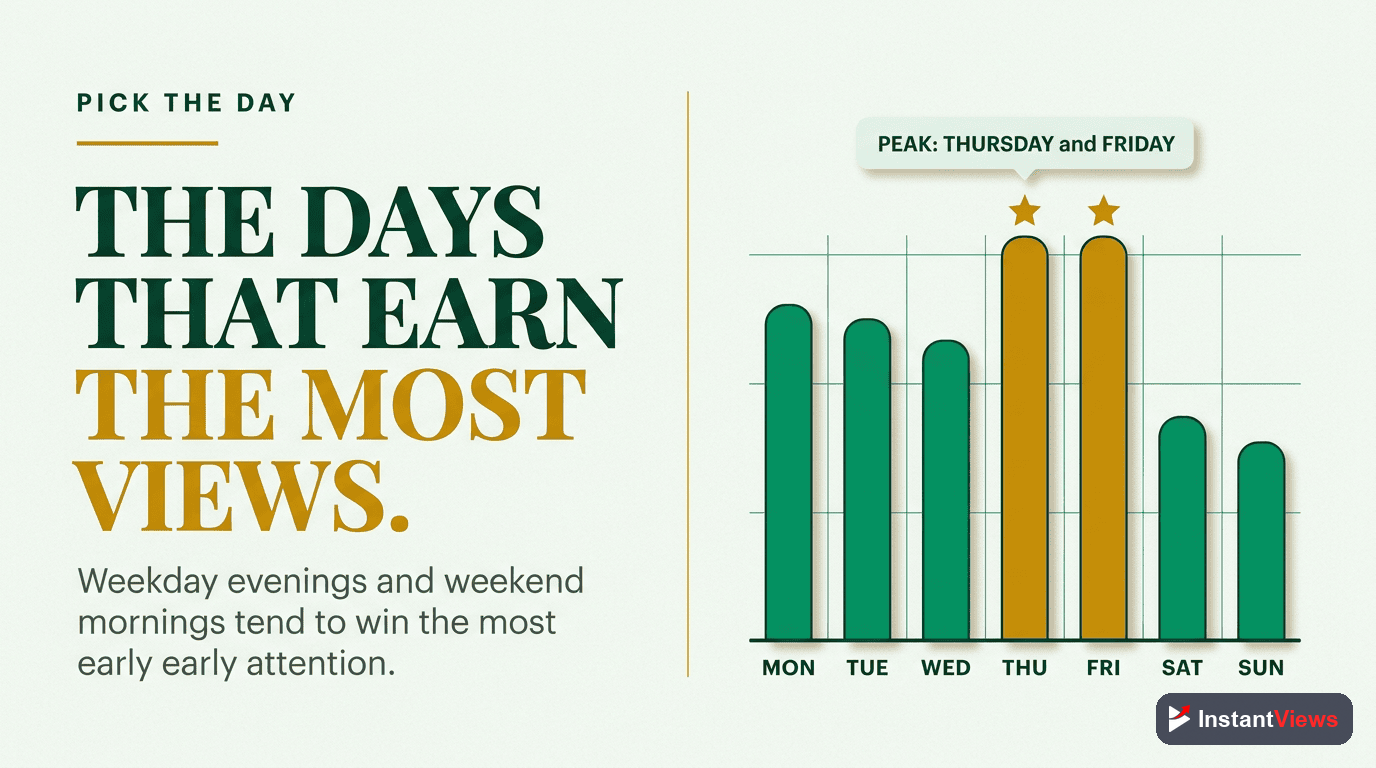
Based on analysis of millions of videos across thousands of channels in 2026, here are the best and worst days to upload:
| Day | Performance Rating | Why |
|---|---|---|
| Thursday | Excellent | Peak engagement as viewers prepare for weekend |
| Friday | Excellent | High activity, content carries into weekend |
| Wednesday | Good | Solid mid-week engagement |
| Saturday | Good | More leisure time, but also more competition |
| Tuesday | Average | Steady but not exceptional |
| Monday | Below Average | Viewers busy returning to work/school |
| Sunday | Below Average | Evening engagement drops as people prepare for Monday |
The winner: Thursday and Friday consistently outperform other days by 20-35% across all content categories.
Best Times to Upload by Day
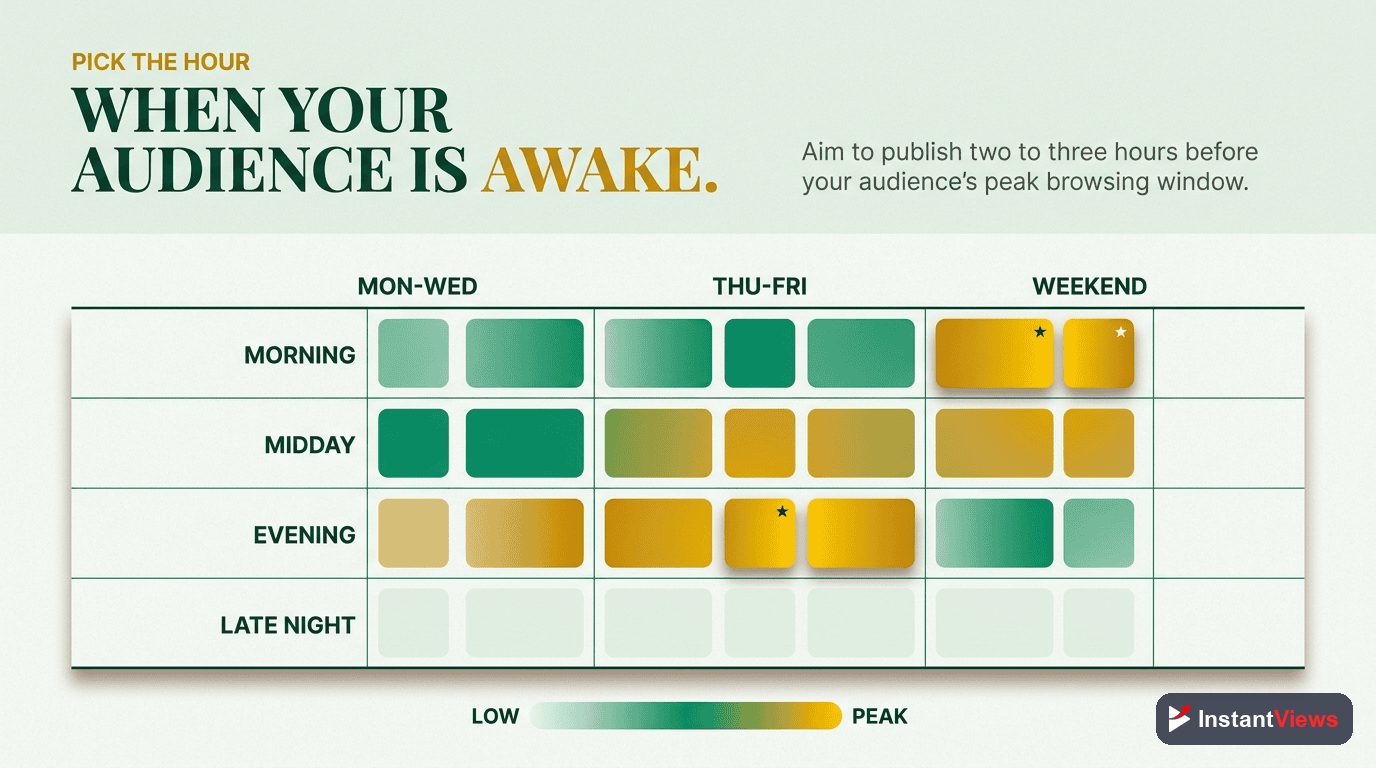
Time of day matters as much as day of week. Here are the optimal upload windows for each day (times in your audience's primary timezone):
Thursday Upload Strategy
The best overall day for YouTube uploads. Viewers have settled into their week and are actively seeking entertainment before the weekend.
2:00 PM - 4:00 PM
Friday Upload Strategy
Videos uploaded Friday afternoon get viewed throughout the weekend, giving them extended initial engagement windows.
12:00 PM - 3:00 PM
Wednesday Upload Strategy
The safe choice - solid engagement without the weekend competition spike.
3:00 PM - 5:00 PM
Saturday Upload Strategy
High viewer availability but also highest competition. Upload early to get ahead of the crowd.
9:00 AM - 11:00 AM
Timezone Strategy for YouTube Uploads
Your upload time should match your primary audience's timezone, not yours. Here's how to handle different scenarios:
Single-Country Audience
If 70%+ of your views come from one country, use that country's primary timezone. For the US, use Eastern Time (ET) as it captures both coasts during waking hours.
Global Audience
Target the timezone with the highest concentration of engaged viewers (not just views, but watch time and interaction). Check YouTube Analytics under Audience > Geography.
Multi-Timezone Strategy
If you have strong audiences in multiple timezones:
- Upload at a time that's "acceptable" for all (2-4 PM ET works for US/Europe)
- Or alternate upload times to serve different audiences
- Prioritize your most engaged audience's timezone
| Primary Audience | Recommended Timezone | Optimal Upload Time |
|---|---|---|
| United States | Eastern Time (ET) | 2:00 PM - 4:00 PM ET |
| United Kingdom | GMT/BST | 3:00 PM - 5:00 PM GMT |
| India | IST | 7:00 PM - 9:00 PM IST |
| Australia | AEST | 6:00 PM - 8:00 PM AEST |
| Canada | Eastern Time (ET) | 2:00 PM - 4:00 PM ET |

How to Find Your Channel's Best Upload Time
Generic advice is helpful, but YOUR specific audience might behave differently. Here's how to find your optimal timing:
Step 1: Check Your Analytics
Go to YouTube Studio > Analytics > Audience > When your viewers are on YouTube. This shows hourly and daily activity patterns.
Step 2: Analyze Top-Performing Videos
Look at your 5-10 best-performing videos. Note when you uploaded them. Is there a pattern?
Step 3: Run Tests
For 4-6 weeks, systematically test different upload times:
- Week 1-2: Thursday 2 PM
- Week 3-4: Friday 12 PM
- Week 5-6: Wednesday 3 PM
Step 4: Compare Performance
For each upload time, measure:
- Views in first 24 hours
- Views in first 48 hours
- Watch time in first 48 hours
- Engagement rate (likes, comments per view)
Step 5: Establish Your Schedule
Once you identify the best-performing time, stick with it for at least 3 months. Consistency allows your audience to anticipate uploads.
"I tested 6 different upload times over 3 months. Switching from Monday 9 AM to Thursday 3 PM increased my first-week views by 73%." - Tech Channel Creator, 450K subscribers
Optimize Your Video Before Upload
Get a complete video analysis including hook, pacing, SEO, and click potential - all before you publish.
Analyze Your Video →
Best Upload Times by Content Type
Different content types have different optimal windows based on viewer intent:
| Content Type | Best Days | Best Times | Why |
|---|---|---|---|
| Educational/Tutorials | Tue-Thu | 2:00 PM - 5:00 PM | Viewers learning during work breaks |
| Entertainment/Vlogs | Thu-Sat | 3:00 PM - 7:00 PM | Leisure viewing peaks before/after dinner |
| Gaming | Fri-Sun | 2:00 PM - 6:00 PM | Gamers most active on weekends |
| News/Commentary | Mon-Fri | 6:00 AM - 9:00 AM | Morning news consumption habits |
| Business/Finance | Tue-Thu | 7:00 AM - 10:00 AM | Professional viewing before workday |
| Lifestyle/Wellness | Wed-Fri | 6:00 PM - 9:00 PM | Evening wind-down time |
Additional Upload Timing Tips
- Upload 1-2 hours before peak viewing time - This gives YouTube time to process your video and start recommending it
- Avoid major events - Don't compete with Super Bowl, major holidays, or viral global events
- Consider your notification audience - If you have high notification engagement, time uploads for when those fans are active
- Schedule in advance - Upload and schedule days ahead to ensure perfect timing without rush
- Monitor competitors - Note when top channels in your niche upload and test similar/different times

Frequently Asked Questions
The best time varies by audience, but data shows 2-4 PM on weekdays (in your audience's timezone) performs well for most channels. Thursday and Friday typically see the highest engagement. However, your specific best time depends on your audience demographics and viewing habits.
Yes, significantly. Videos uploaded when your audience is active get more early engagement, which signals quality to YouTube's algorithm. Videos with strong first 24-hour performance get 3-5x more impressions in the following weeks.
Consistency helps train your audience to expect content, but the specific time matters more than consistency. Upload when your audience is most active, even if that time varies. YouTube Analytics shows your audience's peak activity times.
Use your primary audience's timezone. Check YouTube Analytics under Audience > Geography to see where most viewers are located. If you have a global audience, target the timezone with the highest concentration of engaged viewers.
Check YouTube Analytics under Audience > When your viewers are on YouTube. This shows hourly and daily activity patterns. Test uploading at different times for 4-6 weeks and compare first-48-hour performance to find your optimal timing.
Afternoon (2-4 PM) typically outperforms both morning and late evening for most channels. Morning uploads (6-9 AM) can work for news/business content. Evening uploads (6-9 PM) work for entertainment. Match timing to when your audience has free time to watch.